GitHub’s June 17 announcements look modest on paper: the GitHub Copilot app is now generally available, and Agent Finder is now available too.
Together, though, they mark a more meaningful shift. Copilot is moving beyond the familiar pattern of “AI assistant in chat or in the IDE” and toward a desktop control surface for agent work.
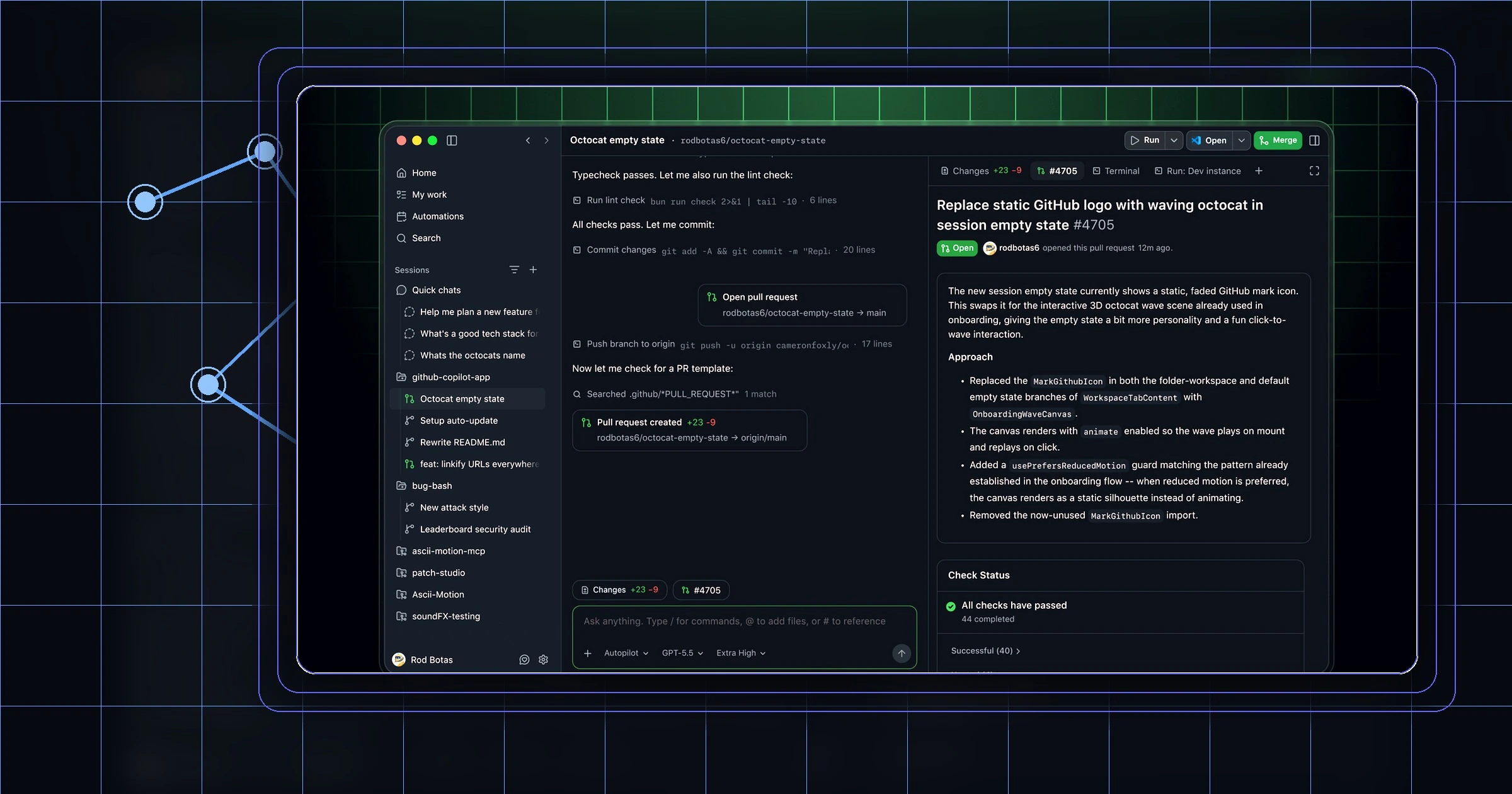
GitHub now has a native app where developers can start sessions from issues, pull requests, or prompts, work against connected repositories, validate changes in an integrated terminal and browser, schedule automations, and open pull requests back into the usual review path. At the same time, Agent Finder gives Copilot a way to discover the right capability at runtime instead of forcing every team to preconfigure an ever-growing pile of tools.
The Copilot app turns Copilot into a place, not just a feature
GitHub describes the Copilot app as the desktop home for agent-driven development, and that is the right way to read the release.
The app is available on macOS, Windows, and Linux. GitHub’s docs say users can sign in, connect repositories, start quick chats, and create full sessions that make code changes. Those sessions can begin from an issue, a pull request, or a plain-language task. GitHub also says developers can run parallel sessions across repositories, each on its own branch and worktree, then inspect the diff, validate the result in the integrated terminal and browser, and open a pull request that still follows the team’s existing checks and merge requirements.
That matters because Copilot is no longer being framed mainly as a place to ask questions. It is being framed as a place to execute repository work.
The UI structure reinforces that point. GitHub’s quickstart docs center the app around My work, Automations, Search, and Sessions. Quick chats are for lightweight conversation without creating a branch or worktree. Sessions are for code-changing work.
Agent Finder tackles a real agent usability problem
The Agent Finder launch solves a different issue: capability sprawl.
GitHub’s pitch is straightforward. Instead of hand-wiring which MCP servers, skills, canvases, tools, and agents should be available all the time, Copilot can search a chosen catalog, return ranked matches, and pull in what the task actually needs on demand. GitHub also says Agent Finder does not silently install or connect anything. It discovers and ranks. The user or enterprise still decides what gets wired in.
A lot of agent products become unwieldy because every useful demo adds one more tool, one more server, one more skill, and one more chunk of configuration. Eventually the system is technically powerful but operationally messy. Users either forget what exists or overload every session with capabilities they might need later.
Agent Finder is GitHub’s attempt to reduce that burden. Instead of asking the user to remember the catalog, Copilot can search the catalog at runtime.
GitHub is also tying this to the open Agentic Resource Discovery, or ARD, specification, which suggests it wants Copilot to participate in a broader discovery ecosystem rather than keep capability lookup as a closed internal trick.
Discovery only matters if it can be governed
The more consequential story is what happens when the app and Agent Finder are combined.
A desktop app gives Copilot a stable place to run sessions and repository work. Agent Finder gives it a mechanism for dynamic discovery. MCP support gives it a path to outside tools. Put together, those pieces turn Copilot into something more like an agent hub.
For enterprise teams, that creates an obvious concern: who controls what the hub is allowed to find and use?
GitHub’s enterprise documentation on MCP management is the missing part of the picture. It says organizations can allow or block MCP server usage, configure an MCP registry URL, and restrict access to only the servers listed in that registry. GitHub describes the registry as a catalog whose entries point to server manifests defining the tools, prompts, and resources available through each server.
That is why Agent Finder matters in practice. GitHub says teams can point it to GitHub’s public catalog or to a private internal registry. It also says discovery is enforced through managed settings, and only permitted resources are surfaced. So the product direction is not “let every agent find everything.” It is “let agents discover what the organization is willing to expose.”
That framing turns discovery from a convenience feature into a policy surface. It also fits a broader Copilot trend. As I argued in why GitHub Copilot bills are exploding and the flat-rate era for AI is over, once AI moves into real work, the difficult questions stop being purely about answer quality. They become questions about invocation, access, and cost.
What changes for developers
For individual developers, the immediate upside is not “more autonomy.” It is less friction.
The Copilot app tries to collapse several routine steps into one surface: finding work, starting a session, making repository changes, validating them, and opening a pull request. If Agent Finder does its job well, it can also reduce the need to remember which tool, server, or skill is relevant before you even begin.
That is the kind of practical improvement that tends to survive beyond the demo cycle. It is similar to why GitHub’s accessibility agent feels like one of the most practical uses of AI right now: the value comes from shortening the path between a real task and the capability needed to move it forward.
There is also a quieter benefit here. Sessions still end in branches, diffs, terminal validation, and pull requests, which makes the app feel less like an AI sidecar and more like an extension of familiar development workflow.
What changes for engineering leads
For engineering leads, the bigger issue is standardization.
A desktop surface for agent work can easily become another unmanaged layer unless teams define boundaries early. GitHub’s own materials suggest it knows that. The app emphasizes reviewable repository work. Agent Finder emphasizes scoped discovery and no silent installation. The MCP docs emphasize registries, allowlists, and policy settings.
Which registries are trusted? Which MCP servers are approved? Should discovery be broad for experimentation or narrow for production work? Which tasks belong in quick chat, and which should require a full session or automation? Those are no longer abstract governance questions. They are product usage questions.
This also overlaps with model management. A session can now combine repository context, a chosen model, external tools, and scheduled execution. That is why the expansion of MAI-Code-1-Flash across Copilot surfaces matters in parallel: GitHub is making model choice part of everyday workflow, and tool discovery is headed in the same direction.
The bigger implication
The most important part of these launches is that Copilot is starting to gain the ingredients of an operational layer: sessions, automations, repository context, runtime capability discovery, and policy-aware access to external tools.
Copilot began as an in-editor assistant. With the Copilot app now generally available and Agent Finder now live, GitHub is turning it into a place where agent work can be started, steered, checked, and connected to approved capabilities.
For developers, that can reduce tool friction. For engineering leaders, it means Copilot now deserves to be treated less like a feature toggle and more like shared infrastructure.
That is the real consequence of these June 17 launches.
Sources
- GitHub Changelog, “GitHub Copilot app generally available,” June 17, 2026: https://github.blog/changelog/2026-06-17-github-copilot-app-generally-available/
- GitHub Changelog, “Agent finder for GitHub Copilot now available,” June 17, 2026: https://github.blog/changelog/2026-06-17-agent-finder-for-github-copilot-now-available/
- GitHub Docs, “Getting started with the GitHub Copilot app”: https://docs.github.com/copilot/how-tos/github-copilot-app/getting-started
- GitHub Docs, “MCP server usage in your company”: https://docs.github.com/enterprise-cloud@latest/copilot/concepts/mcp-management